A CRM record is rarely as final as a commission calculation would like it to be.
Deal values change, close dates are corrected, ownership is reassigned, and discounts appear after booking. A transaction that looked complete in March may contain different information in April.
Correcting the source data is usually the easy part. But what should that correction be allowed to change in the incentive compensation process?
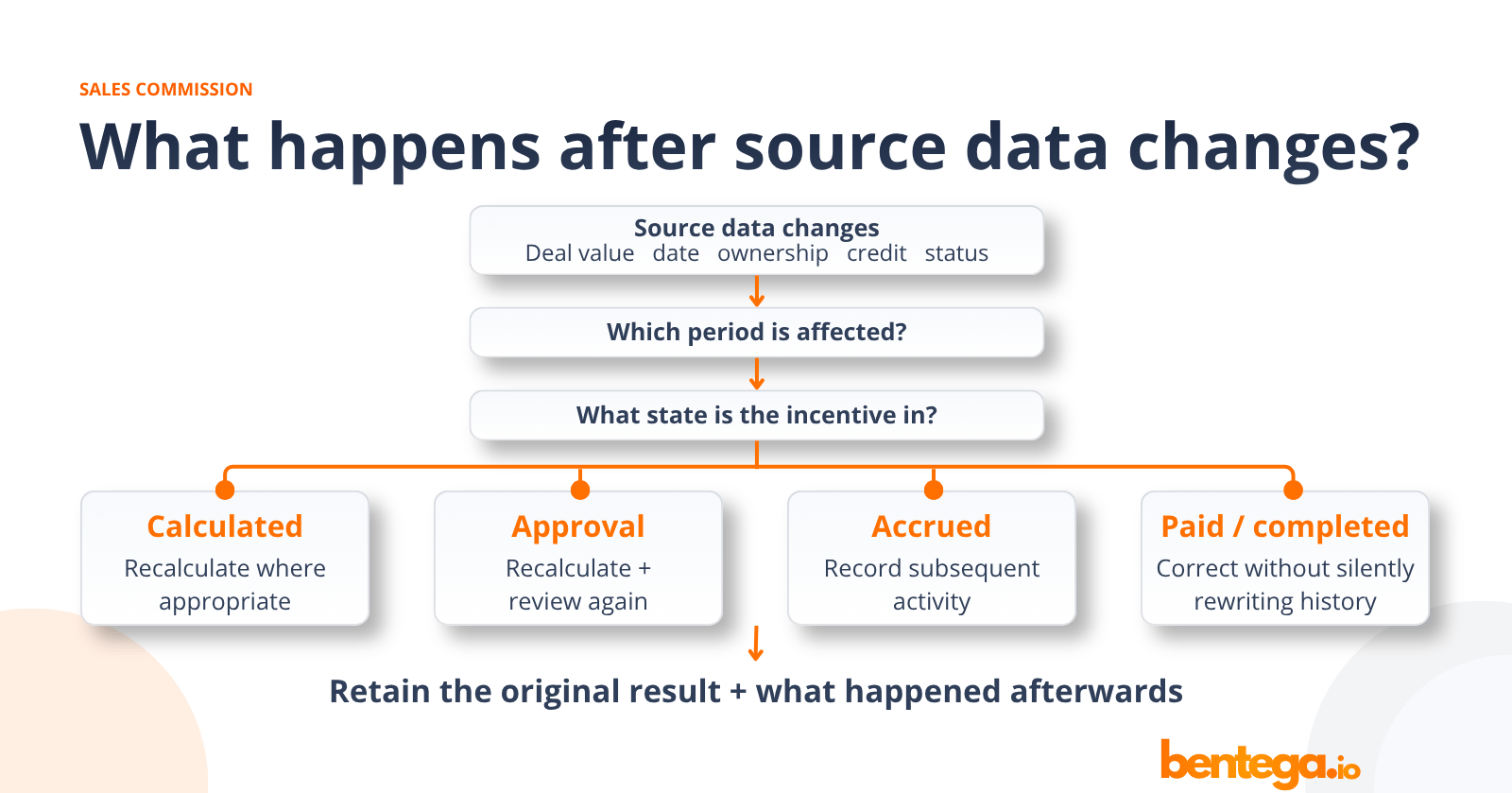
This is fundamentally an incentive compensation management problem: teams need to know which source data changed, which period is affected, and what should happen to the calculation, review and historical record.
A correction made while the current period is still open is very different from one made after the commission has been approved, accrued or included in a completed historical period. Simply recalculating everything whenever CRM data changes can make historical payouts almost impossible to explain.
This guide looks at how RevOps and Finance can handle backdated changes without losing control of the original calculation, approval history or subsequent adjustments.
What is a backdated commission change?
A backdated commission change happens when information relevant to a sales commission calculation is corrected or changed after the underlying event originally occurred.
That might mean changing a deal amount, close date, ownership, sales credit, product classification or another source-data field after an incentive calculation has already been produced.
The important question is not only what changed.
You also need to know which performance period the change affects, which incentive rules applied and how far the affected result has already progressed through the incentive process.
The same source-data correction can therefore require very different treatment depending on when it happens.
Correcting historical source data is also different from changing the compensation plan itself. A source correction updates information about an underlying event. A plan change alters the rules used to determine compensation.
For planned changes to rates, quotas, crediting rules or other compensation terms during an active period, see our guide to changing commission plans mid-quarter.
Source data changes for many different reasons
Not every backdated change is an error. Commercial data evolves as transactions move through the business, and some information is only confirmed after an initial calculation has been produced.
Deal value changes
A transaction originally recorded at €100,000 may later become €90,000 because of an amendment, discount or correction.
If the relevant commissionable value changes, the calculated incentive may change with it.
Close or earning dates change
A transaction may originally have been assigned to one period and later corrected to another.
That can affect more than the individual deal. It may also influence period attainment, thresholds or accelerators.
Ownership changes
CRM ownership often describes who owns an opportunity or account now.
That does not necessarily answer who should receive commission credit for an event that occurred earlier.
Sales credit changes
RevOps may determine that a transaction should have been split differently, assigned to another participant or handled through an overlay arrangement. Sales credit, CRM ownership and the eventual commission calculation are connected, but they are not interchangeable concepts.
For a deeper explanation, see split commissions and sales crediting.
Status or classification changes
A transaction may be cancelled, reopened or reclassified. Product, segment, currency, margin or another field used by the incentive calculation may also be corrected.
The underlying principle is the same:
A change in the source system tells you that something changed. It does not, by itself, determine what should happen to an earlier incentive result.
The treatment depends on how far the result has progressed
Before deciding what to do with a backdated correction, establish where the affected incentive sits in the process. The practical distinction is between a result that is still being calculated or reviewed and one that has already moved further downstream.
The purpose of this distinction is to prevent a later change from erasing what had already happened.
An approval of €5,000, for example, should not silently become an approval of €4,500 just because the underlying calculation later changed.
Example: a €100,000 deal becomes €90,000
Consider a simple plan paying 5% commission.
The original transaction is:
Commissionable value: €100,000
Commission rate: 5%
Calculated commission: €5,000
The source data is later corrected:
Commissionable value: €90,000
Commission rate: 5%
Corrected calculation: €4,500
The math is simple. What should happen operationally, however, depends on timing.
-
If the correction happens before review, the affected calculation can be updated to €4,500.
-
If the original €5,000 result has already been approved but the current workflow is still open, the changed €4,500 result should go through the appropriate review again as the earlier approval related to a different amount.
-
If the €5,000 has already moved into the accrual and payout process, silently replacing it with €4,500 would start to erase the history of what was originally calculated and accepted.
At that point, the €500 difference needs to remain distinguishable as subsequent activity.
This is why a rule such as “CRM changed, therefore recalculate commission” is too simplistic. The source correction tells you what changed. The state of the incentive tells you how that change should be handled.
CRM ownership and commission credit are not the same thing
Ownership changes are particularly easy to mishandle.
Imagine Alice owns an opportunity when it closes and receives commission credit for the sale.
Two months later, Alice changes territory and Bob becomes the account owner. RevOps updates the CRM so Bob now owns the opportunity.
That may be entirely correct from a CRM perspective.
But it does not automatically follow that Bob should replace Alice in the historical commission calculation.
The CRM is describing current commercial ownership. The incentive process needs to determine who earned credit according to the applicable rules when the relevant event occurred.
These concepts therefore need to remain separate:
CRM owner ≠ sales credit ≠ quota credit ≠ commission recipient
A current CRM field should not silently become a historical compensation decision.
A backdated date change can affect more than one transaction
Correcting a transaction date may look like a single-record change, but dates often determine which rules and periods apply.
Moving an event from one period to another can potentially affect:
- the applicable incentive rule
- commission period
- quota attainment
- thresholds or accelerators
- ownership or crediting
- currency treatment
- approval timing
- expected payout
Suppose a transaction moves from 31 March to 2 April.
The commission on the individual deal might remain unchanged. But March attainment could fall below an accelerator threshold while April attainment increases. Other transactions in both periods may therefore be affected.
A backdated date correction should consequently be treated as an impact-analysis problem.
Recalculation and adjustment solve different problems
One distinction makes backdated changes much easier to reason about.
Recalculation asks:
Given the relevant rules and corrected inputs, what should this active calculation now be?
An adjustment asks:
Something happened after the original result. What should happen now?
These are very different questions.
When an incentive is still inside an active current-period workflow, recalculation may be appropriate. But when the original result has already moved through later stages, preserving what originally happened and recording subsequent activity separately can provide a much clearer operating record.
Otherwise each correction gradually rewrites the history that Finance, RevOps, managers and employees may later need to understand.
Protect completed periods from silent recalculation
A completed period should remain explainable.
Someone reviewing a historical commission should be able to establish:
- What rule applied?
- What source data was used?
- What amount was calculated?
- What was approved?
- What happened afterwards?
If later CRM corrections continually rewrite earlier calculations, those questions become increasingly difficult to answer. The latest number may be mathematically correct based on today's data, while the organisation has lost the ability to reconstruct what actually happened at the time.
Protecting that history is part of a broader incentive compensation governance framework.
A practical workflow for backdated changes
A consistent decision process can handle most backdated changes without creating a new exception workflow for every CRM correction.
1. Identify exactly what changed
Start with the source event.
Was it the amount, date, ownership, credit allocation, status, classification or another field?
Do not begin with “How do we fix the commission?”
Begin with the factual change.
2. Establish the affected period
Determine which earning or performance period the corrected information relates to.
The date the correction is entered and the period it affects may not be the same.
3. Check how far the incentive has progressed
Has the result only been calculated?
Has it been approved?
Has the amount already moved into accrual or payment activity?
This determines whether the appropriate response is primarily recalculation, renewed review or subsequent adjustment.
4. Assess the wider impact
Do not inspect only the transaction that changed.
Check whether the correction also affects attainment, thresholds, accelerators, another participant, crediting or other related results.
5. Recalculate or record subsequent activity
Use recalculation where the affected result is still part of the active workflow.
Where the original result belongs to completed history, keep subsequent corrections distinguishable rather than silently replacing what happened before.
6. Review changed results again
If an affected calculation changes after someone has reviewed or approved it, the changed result should go through the appropriate review process again.
A previous decision should not automatically apply to a different amount.
7. Retain the history
The final record should make it possible to distinguish:
what happened originally from what changed afterwards.
That is what makes later questions, disputes and reconciliation manageable.
How Bentega helps manage backdated changes
Bentega helps separate active incentive calculations from completed incentive history.
When relevant source data changes during an open period, affected calculations can be updated. If an affected result changes after it has already been reviewed, it can return to the appropriate review process rather than relying on an approval given to the earlier result.
Completed prior periods remain protected from silent recalculation. Once an approved amount has been accrued, later payments, corrections and clawbacks can be handled as subsequent payout activity rather than automatically rewriting the original calculation.
This gives RevOps, managers and Finance a clearer view of both how the original incentive was calculated and what happened afterwards.
.png?height=200&name=You%20Get%20What%20You%20Pay%20For%20(2).png)