
Skip to content

METRICS & KPIs SOFTWARE

Build your own KPIs. Track what matters.

Turn your business data into clearly defined performance measures. Build custom metrics, combine them into meaningful KPIs and track results against targets for individuals, teams and the company.

Use Metrics & KPIs on its own, or connect selected measures to bonus and commission calculations with Bentega’s incentive compensation functionality.
    Bentega KPI results showing performance against targets for the selected period.

    YOUR DATA. YOUR DEFINITIONS.

    Measure performance on your terms.

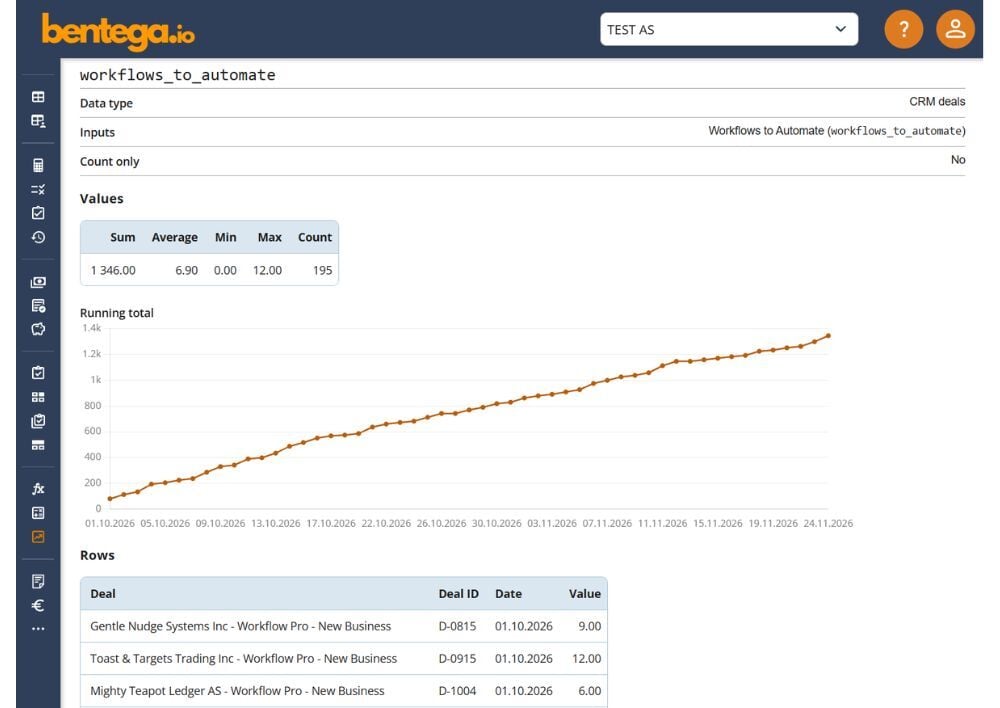
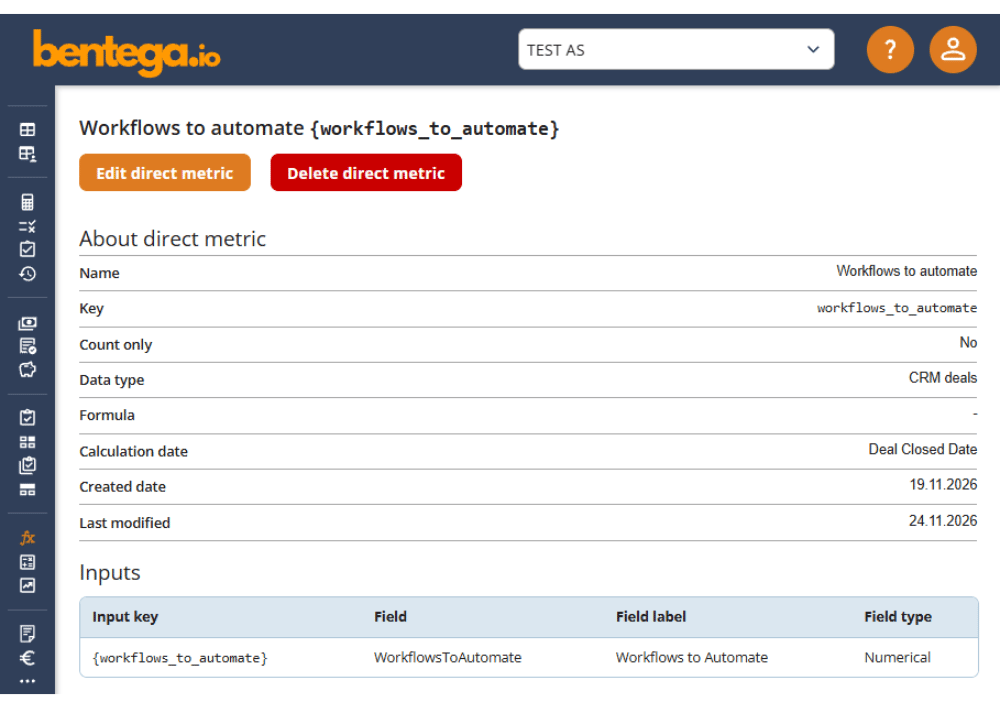
    Define what counts, which records qualify and how the result is calculated. Use your source fields, including custom fields, to build measures that reflect your business.

    Count qualifying activities, sum values, calculate averages or identify minimum and maximum results. Add conditions to select the relevant records and use formulas when your measure requires several inputs.
    Explore your metric requirements
    Configuring a custom metric in Bentega

    BRING THE RELEVANT INPUTS TOGETHER

    Build the measures your source systems don’t give you.

    Some business questions require more than one number. Combine existing metrics in a formula and set the calculation periods that give the result its meaning.

    Bring revenue and cost inputs together, calculate a conversion rate or compare performance across defined periods. Configure the underlying definitions in Bentega so your team has a consistent basis for interpreting the result.

    Where the inputs sit in different systems, we can help establish the connections, mappings and calculation requirements.
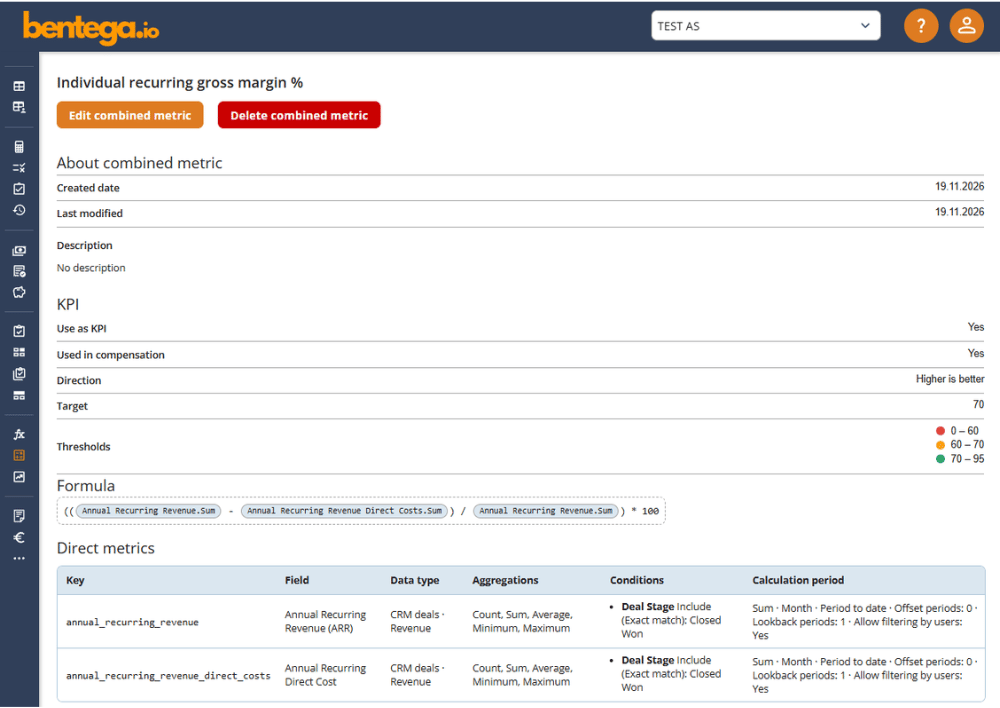
    Bentega combined metric configuration showing input metrics, calculation periods and a formula.

    PUT THE RESULT IN CONTEXT

    Make it clear what good performance looks like.

    Turn a metric into a KPI by defining its target, performance direction and scope. Give the result a clear connection to the objective it is meant to support.

    Set the performance direction

    Choose whether higher, lower or closer to target represents better performance. Match the direction to the outcome you want to achieve.

    Define targets and thresholds

    Add a target and optional coloured ranges to help people interpret performance against expectations.

    Choose the relevant scope

    Track individual, team or company performance using the appropriate source records, ownership mappings and metric configuration.

    FROM EVERYDAY ACTIVITY TO BUSINESS OUTCOMES

    Follow the measures behind your priorities.

    Start with the business question, then define the inputs, qualifying records and measurement period. Bentega gives you the building blocks to configure measures around your requirements.

    Activity and conversion

    Count qualifying customer meetings or combine outcome counts to calculate a conversion rate for the relevant population and period.

    Retention and expansion

    Define measures such as net revenue retention using your agreed customer base, revenue movements and calculation period.

    Revenue and efficiency

    Combine relevant revenue and cost measures to understand performance against your chosen business definition.

    These are configuration examples. The required data sources and definitions are agreed as part of your setup.

    CONNECT MEASUREMENT TO REWARD

    When a KPI should influence pay, take the next step.

    Track KPIs independently, then choose which measures should contribute to bonus or commission calculations. With Bentega's incentive compensation functionality, you can define how the measured result translates into earnings, who participates and how the amount is reviewed. The KPI defines the performance. The incentive model defines the reward.

    START WITH A MEASURE THAT MATTERS

    From business question to a KPI you can use.

    Define the measure

    Agree what you want to understand, how the result should be calculated and whose performance it represents.

    Bring in the data

    Connect or upload the relevant source data. Configure fields, qualifying conditions, calculation periods and formulas.

    Validate and track

    Check representative results, add targets and performance direction, and review the KPI for the intended people, teams or company.

    PRICING THAT FOLLOWS YOUR METRICS

    Pay for the measures you use across your business

    Each metric definition counts once, even when used across multiple people, teams or reporting periods.


    Metrics & KPIs
    Includes 10 active metrics. Available as a standalone subscription or an add-on the incentive compensation module.
    USD 89 per month with an annual agreement
    Additional metrics
    Add five active metrics when you need more measurement definitions.
    USD 49 per month with an annual agreement

    Standalone subscriptions include one standard connection. Add-ons use the connections available in your existing plan. Draft and archived metrics do not count towards the active allowance. Prices exclude applicable taxes. Monthly agreements cost 25% more. Implementation and additional requirements are priced separately.

    View the full pricing details →

    METRICS & KPIs QUESTIONS

    What would you like to measure?

    Can we use Metrics & KPIs without calculating bonuses or commissions?

    Yes. Metrics & KPIs is available as a standalone subscription for performance measurement and tracking. You can use it without an incentive compensation subscription.

    Can we create our own calculation definitions?

    Yes. Define metrics using source fields, aggregations, conditions and formulas. You can also combine existing metrics and configure calculation periods to reflect the measure you need.

    Can the same metric be used across multiple people and teams?

    Yes. A metric definition can be used across people and teams where its data and filtering configuration support that scope. It counts as one definition rather than one metric per person.

    What counts towards our active metric allowance?

    Each active calculation definition counts once, regardless of how many people, teams or reporting periods use it. A different calculation definition counts separately. Draft and archived metrics are excluded.

    Can we combine data from different systems?

    Yes, where the required data can be connected or imported and mapped appropriately. We assess the source systems, access, fields and update requirements during implementation.

    Can a KPI be used to calculate a bonus?

    Yes, when paired with the appropriate incentive compensation functionality. Make the selected KPI available for compensation, then configure the incentive model that turns the result into earnings. Metrics & KPIs alone does not calculate incentive payments.

    Can we try it before subscribing?

    Yes. Request a 30-day trial and tell us that you want to explore Metrics & KPIs. We will arrange the relevant setup and help identify a useful starting point.

    MAKE YOUR PERFORMANCE MEASURES USEFUL

    Bring your first KPI into Bentega.

    Start with a measure you already track or a business question your current reporting leaves unanswered. Explore how your data, definitions and targets come together in a free trial or guided demo.